


Editing Video in Windows Live Movie Maker 2011

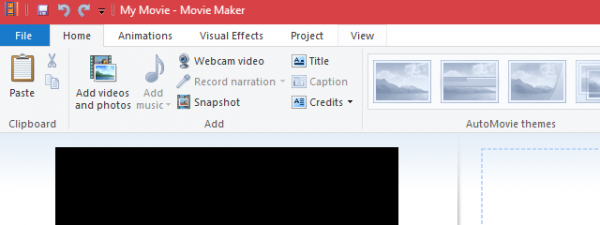
In our previous tutorials, we introduced you to Windows Live Movie Maker 2011 in screenshots and showed you how to Import Photos and Videos into Windows Live Movie Maker 2011. The next step is to begin editing your video clips in Windows Live Movie Maker 2011. Windows Live Movie Maker’s video editing tab lets you split and trim video clips and adjust their speeds. In this tutorial, you’ll learn how to use all of these tools and functions.

Arranging Clips on the Timeline

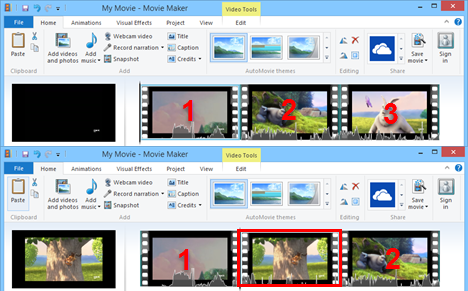
When you import video clips or photos, they are automatically inserted into the timeline after the clip you currently have selected on the timeline.

Windows Live Movie Maker 2011

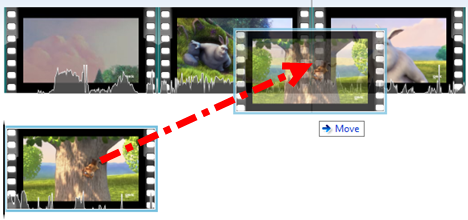
You can easily re-arrange the order of the video clips by dragging and dropping them.

Windows Live Movie Maker 2011

Surrounding clips will automatically get shifted on the timeline accordingly. Note that Windows Live Movie Maker 2011 doesn’t allow any “blank space" on the timeline - every second of the timeline must be filled by a photo, video, transition or title card.
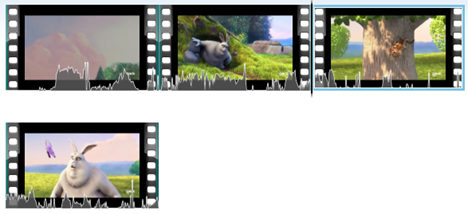
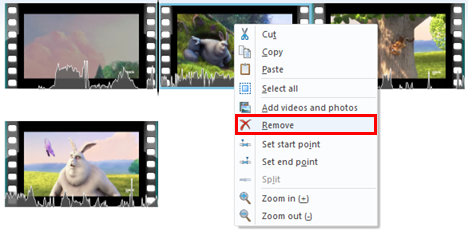
Likewise, when you remove a clip from the timeline, the surrounding clips shift to fill the gap left behind and shortening the overall length of your movie. You can remove clips by right-clicking them and choosing Remove or by selecting them and pressing Delete on the keyboard.
Windows Live Movie Maker 2011

You can also cut, copy and paste the clips using the corresponding commands in the contextual menu, or by selecting a clip and pressing CTRL-X, CTRL-C or CTRL-V, respectively.

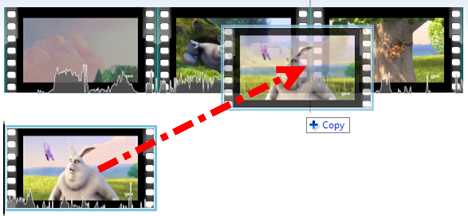
An even faster way to duplicate clips is to hold CTRL while dragging and dropping a clip. An exact copy of the clip will be placed where you release the mouse, and the original clip will remain in place.
Windows Live Movie Maker 2011

Splitting and Trimming Clips

In addition to re-ordering clips on the timeline, you can also trim them or split them into separate clips. Both of these tools are on the Edit ribbon.

Windows Live Movie Maker 2011

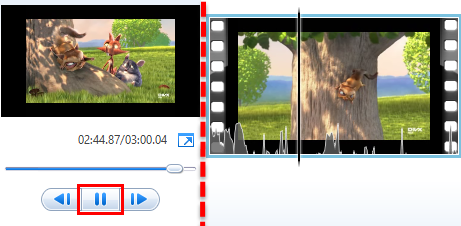
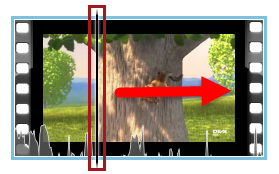
To split a clip, position the play cursor at the point where you’d like to split the clip. To do this, click the long black vertical cursor and drag it into the middle of a clip.
Windows Live Movie Maker 2011

Or, you can click Play on the preview pane and hit Pause when you reach the point in the clip where you’d like to split it.

Once you have the cursor positioned correctly, click Split.
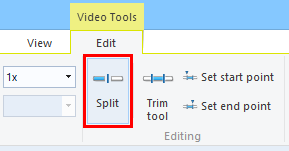
Windows Live Movie Maker 2011
This creates two separate clips, which you can now re-arrange, trim and apply effects to independently from one another.

There are two ways to trim video clips. The easiest way is to set the start point and end point. When you set the start point, Windows Live Movie Maker 2011 deletes the clip footage that precedes the cursor. When you set the end point, the clip footage after the cursor is removed. To set the start and end points, position the cursor as you did above and click Set start point or Set end point.
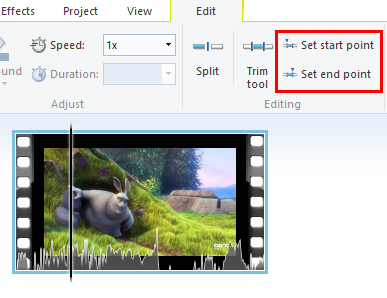
Windows Live Movie Maker 2011

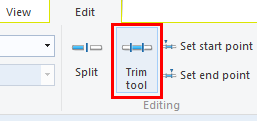
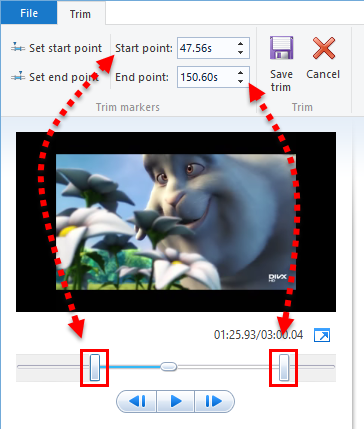
Alternately, you can use the Trim tool. To open it, select a clip and click Trim tool in the Edit ribbon.

Windows Live Movie Maker 2011

You can set the start point and end point either by dragging the sliders underneath the preview or by entering the times in manually. You can do multiple trims by clicking Set start point and Set end point. This updates the clip with the new start and end points so you can trim it again. When you’re finished, click Save trim.

Windows Live Movie Maker 2011

If you make a mistake, you can press CTRL-Z to undo or delete the clip and re-import the original and start over.

Unfortunately, there is no easy way to join clips or combine clips in Windows Live Movie Maker 2011. If you absolutely need this function, you can create a project with the clips you want to combine and export it as a .WMV and then import it back into your main project.

Speeding Up or Slowing Down Clips

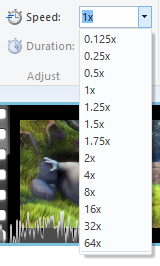
To change the speed of a clip, select it and choose a speed from the drop-down menu next to Speed.

Windows Live Movie Maker 2011

Note that when you change the speed of a video clip, Windows Live Movie Maker 2011 removes the audio from it. This is because the audio’s pitch will be effected by the change in speed. If you want to retain the audio, you can extract it using a program like Audacity or AoA Audio Extractor, but when you add it back in, it will be out of sync. We’ll cover working with audio in Windows Live Movie Maker 2011 in a later tutorial.

Changing Video Volume

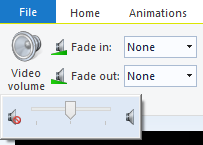
You can alter the volume of each video clip by selecting it and clicking Video volume and dragging the slider. You can also have the audio fade in or fade out at three different speeds: slow, medium and fast. Simply choose your fade in/fade out speed from the drop-down menu in the Audio pane.

Windows Live Movie Maker 2011

Related articles:

Adding Music to Videos in Windows Live Movie Maker 2011
Rotating Videos with Windows Live Movie Maker 2011
Import Photos and Videos into Windows Live Movie Maker 2011
How to Add Titles, Captions and Credits in Windows Live Movie Maker 2011
How to Add Animations and Visual Effects in Windows Live Movie Maker 2011
How to Get Rid of Black Bars in Windows Live Movie Maker Videos

Comments

In Windows Live Movie Maker I would like to learn how to make my music videos synchronize to one volume level? The problem I’m having is that when I pull music video from YouTube, edit them on WLMM and then burn the videos on to DVD, each music video are at different volume levels. Does WLMM have a way to synchronize the total project to one volume level?
Thanks,

Art

Hi Art - Thanks for reading.

What you're trying to do sounds simple, but in reality, it's not. In it's most simple terms, what you are asking is whether you can NORMALIZE the audio in your videos so that a certain Db threshold isn't exceeded. For example, you could have all your videos normalized at -3 Db, which, in theory, should help prevent one video from being dramatically louder than the next. For this, you could use a program like Audacity (free), but you'd have to separate out the audio and then mix it back down, which is kind of a pain.

http://audacity.sourceforge.net/

You can also usually introduce normalization when burning DVDs. I don't believe that Windows DVD maker has this feature--which program do you use?

But what's really at issue here is that there are lots of moving parts here that are going to impact how "loud" each video sounds upon burning, and not all of them are under your control.

First and foremost, the issue is that when people shoot/encode/upload YouTube videos, they'll be doing so with varying types and quality of hardware and software. At any point during the authoring, mixing down or encoding of the original video BEFORE it was uploaded to YouTube, there could have been noise or other quality issues introduced that can affect how loud it seems upon playback.

So, what I'm saying is that normalizing--either before you add them to your Winodws Live Movie Maker project (via Audacity) or while you burn them to a DVD will help but it won't fix it 100%--not by a long shot.

You're best off sourcing your material from somewhere more consistent than YouTube. Barring that, I think you're just going to have to use what you'll learn about normalizing and do some trial and error in order to determine what will sound best in real life

I am new to this movie maker and can't figure out why my mouth is not moving correctly with my words. (when you view it/me) And, my voice is higher pitched than normal. I thought it maybe had to do with the speed of the video, but I have no option in the edit section to adjust the speed. Every tutorial talks about this and shows a screen shot, but my "speed" option doesn't exist at all. Can you help? I can't go on and post it like it is!!! It sounds/looks silly. Thanks.

I have recorded a video, but when I want to use it in Windows Live Movie Maker, it only gives me the sound (the picture is just white with an X in it, showing that it's broken or something). That's okay, because as a matter of fact, I only need the sound of the video. But there's my problem; how do I put the video in the sound line? If it's even possible, of course. So I could have a picture in the visual line instead. I could do this in WMM, but not in Live?

I have a long (11 minute) video that I want to take out various sections to make an eventually shorter video. I have just discovered Movie Maker and have been reading tutorials but can't figure out how to remove sections of the video.

Read the section Splitting and Trimming Clips of this tutorial. You simply need to split it into shorter videos and delete the parts you do not want to have in the final version.

When I speed up a movie, it seems to cut off the end bit for some reason and it's annoying me quite a bit. >.<

its happening to me also, how do you fix this?

Hello
after inserting the clips and playing the edit video there is a short pause between the clips. how can I run it without the short pauses.

tks

Thank you so much for your tip on combining video clips!! I have been trying everything for a few hours. This only took a minute. Like you said, no easy way to join clips, but this worked and was better than nothing!

I would like to ask, if it's possible to add multiple pictures on one clip?

Yes, you can.

how? Hm, do you have any templates for powerpoint?

I don't understand your question. What do Powerpoint templates have to do with editing video in Windows Live Movie Maker?

Hi, I have a video that is 15:35 and everytime that I try to save it as a movie, it loads up until 69% and then stops...I can't cut anything out of it to make it shorter...any advice?!?

I have the exact same problem....loading clips from a GoPro HD as mg4's....it gets to 69% and stops. What should I do. Csupastar...did you get an answer?

hi, i want to make video game playthroughs to post on my youtube account, problem is i have a 19 minute video and no idea how to make it into two shorter videos without removing any footage from the videos. any help would be greatly appreciated.

how can i edit video that is out of sync. the video and audio is out of sync that's what i mean.

Often, as soon as I insert a clip into Moviemaker (sometimes, after I do my first Split) I get a message that the program is shutting down but never get word on what was wrong. Any suggestions? Thanks.

Please, help me! I have a question... I am in the process of making a music video, i had to combine two videos and once i did that and put the transitions to make it look right i put the song on audio and some parts were not in sync so i just deleted it and decided ill put the first video and audio together, save it, and then put the second video and audio together, save it, and then just combine them with the music already on it.. well there's a problem micro soft windows movie maker wont let me import a video that i made on there.. how do i import videos i made on micro soft windows movie maker so that i can combine them..?

I put pictures in the timeline and I want to cut them at a certain time to fit the music. Yet for some reason, when I click on the edit section, the option to split, cut or even trim the pictures on this new timeline is not available. Is there any way to fix this problem?

Do it have timeline in movie maker live like the old version of movie maker?
in the old version, we can arrange how long the item are shown.. we can put it slow or quick... how we can do that in the new version? coz it help me a lot for time managing...

second, can we put two text in the same time?

I would like to have a video clip play the audio straight through while I actually show some other video clips over the top of the audio. Can Windows Live Moviemaker do that?

You should be able to do that. Look at our tutorials on Windows Live Movie Maker to find out how it works.

i've created videos many times and no problems, however today when i created a video to upload to youtube, it would not transfer my file when i said save as movie. I tried multiple times and what happens is it says "Windows live movie maker is not responding." I dont know what to do

Hi i wanted to extract audio from one video and fix into other video by using windows live movie maker. Can you please help me out how to take that audio and place into other video.

Extracting only the audio from a clip is done with other tools. See this article for help: http://www.ghacks.net/2011/07/15/how-to-extract-audio-from-video-files-u...

Hey, I tried making some edited videos for YouTube,when I made my first video the video itself did not have any audio, as I recorded it with the audio recording setting off. I edited the video and uploaded it with a separate music soundtrack and that worked fine, but for the next series of videos I tried to edit their original audio was not moved into Movie maker. Why cant I get the original audio into Movie Maker?

Please help! I need to overlap a picture and video for a ghost scene. It's for my media arts project but since this doesn't have a time line I'm finding it impossible :/ should I give up or is there a way?

Ii am new to movie maker and only used imovie before. I cna't seem to figure out how to remove clips I don't want... or remove part of one and part of another... ideas? solutions?

See the section about trimming and splitting in this tutorial.

i want to know what to do i want to take sound out of a video and put in a different voice??

Hello. I've just finished splitting a movie in order to upload it to YouTube but when I try to save it, it's only saving about 6kb and not the whole thing. Also I'd like to save it in parts: Title:part1, Title:part2, etc. I've looked all over to find how to do that and I'm stumped. Any suggestions?
Thanks in advance.

hi,
I am new at windows movie maker. I just wanne know how can I add a channel logo in the corner of every frame of the film

I'm not used to the 2011 Movie Maker. I'm used to the 08 version. There's a part in the audio I don't want in my video, how do I cut it out?

See this tutorial for an overview of all the audio editing features Windows Live Movie Maker is capable of: http://www.7tutorials.com/adding-music-videos-windows-live-movie-maker-2011

Can you please tell me how to add videos and photos beside the credits on Windows Live Movie Maker??

I am trying to sync my photos to my music so I have a certain part of a song with a different photo. How do I do that manually? I tried using the auto-video and it put the photos in the wrong place and not where I want them in the song.

Okay, so I made this music video and i made sure that my mouth went along with the words perfectly. Then i replayed it and everything was off. It seems as though when I click in the middle of the movie it changes where the music is.

Hi,

Could you please tell me how to mesh clips together? As one clip draws to an end, I want the following clip to begin playing before the first one has come to a complete end. That way there isn't a sharp stop and go between clips. Please tell me there is a way to do this in Windows Live Movie Maker. It would really be a shame it newer versions are less capable than older ones.

Thanks,
Tim

Hi! I a new to this totally!! I have a series of short video messages that I have uploaded. The problem is everything is how I want it except the video messages overlap by a tiny bit. I would like to know how to make a short pause/gap between them so the whole video message is played :)

Hi, I am trying to make narrations on Windows Live Movie Maker but it won't let me do several at a time, like different tracks playing at the same time. Every time i try this it cuts out the first narration selected and its driving me crazy. Any advice would be amazingly appreciated :)

Add new comment