




One of the most hated features of Windows Vista is the User Account Control, or UAC in short. Many people found it annoying and chose to disable it right away, even if this meant exposing their system to additional security threats. In Windows 7, Microsoft has seriously changed this feature. Now users have a lot more control over it and how it works and it should provide a better user experience. To see how much improvement this means in numbers, I have run a comparison between the default Windows Vista and Windows 7 UAC levels. Let's see which one wins and why.
Benchmark Description: What I Tested
First, I searched for the list of all tasks which require administrative privileges which can trigger an UAC prompt. I started with this list of items which trigger User Account Control prompts from Ed Bott and customized it a bit to be as relevant as possible for both Windows 7 and Windows Vista.
The list of tests I ran is the following:
- Running an application as an Administrator - I ran random applications as an administrator, by right-clicking on their shortcuts and choosing 'Run as administrator'. This is done when you need to use older applications, compatible only with Windows XP, and which need access to system files and settings.
- Changes to files and folders in the Windows and Program Files folders - I tried to edit random system files found in both Windows and Program Files folders. I also tried to create new folders and then delete them.
- Installing applications -I installed several applications, from CD burners to browser plugins and antivirus software.
- Uninstalling applications - I uninstalled the same list of applications used in the installation exercise.
- Installing & uninstalling device drivers - in order to test this, I installed drivers for all the components in my PC and then I uninstalled them.
- Installing ActiveX controls - for this test I used the ActiveX from Nvidia's driver download page.
- Changing settings for Windows Firewall - with Windows Firewall enabled, I customized some of its settings and rules.
- Changing UAC settings - for this test I turned on and off the User Account Control feature.
- Configuring Windows Update Settings - I changed the Windows Update settings.
- Adding or removing user accounts - I created and deleted multiple user accounts, both as standard users and administrators.
- Changing a user's account type - this test involved changing the type for one of the test accounts from standard to administrator and vice-versa.
- Configuring Parental Controls - for this test I set different Parental Controls rules for different user accounts.
- Running Task Scheduler - this test is pretty weird. In Windows Vista, if you run the Task Scheduler from Start Menu -> Accessories -> System Tools, no UAC prompts are shown. However, if you run it from Control Panel -> System and Maintenance -> Administrative Tools, you do get an UAC prompt. Therefore I ran the shortcut from the Control Panel in both Windows Vista and Windows 7.
- Backup & Restore Files and Settings Using Backup & Restore or Windows Easy Transfer - I used both tools to backup and restore user data and settings.
- Viewing or changing another user's folders and files - this meant browsing through another user's folder, adding and removing files and folders.
- Running Disk Defragmenter - I ran this tool to defragment several drives
- Changes to system-wide settings - I changed different settings in the Control Panel applets, including security policies.
All these tests were run with the default UAC levels. In Windows Vista this means having UAC turned on while in Windows 7, it means having it turned on and set to 'Notify only when programs try to make changes to my computer'.
Test Results
The test results are summarized in the table below.
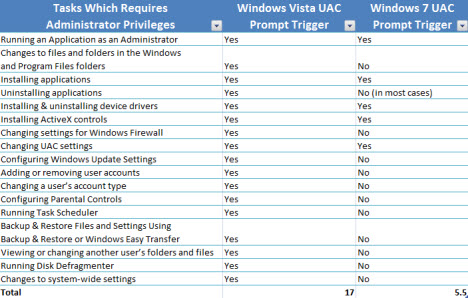
In Windows Vista, an UAC prompt is triggered in all 17 scenarios. In Windows 7, in only 5.5 of them. The half of point was assigned due to the fact that, when uninstalling some applications, Windows 7 can show an UAC prompt. This happens only when you uninstall applications which modify important system settings. In the tests I ran, only the uninstall of the Microsoft Silverlight plugin triggered an UAC prompt, while all other applications did not. Depending on what type of applications you are working with, you might never encounter an UAC prompt when uninstalling an application.
As you can see in the graph below, in Windows 7 you will not encounter UAC prompts in at least 11 of the scenarios where Windows Vista triggered one.
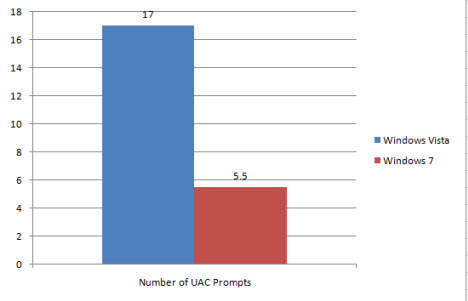
This means a reduction of approximately 67%, depending on how you use your PC and which are the most common tasks you perform.
Conclusion
When it comes to the UAC Benchmark, Windows 7 wins easily and with a huge difference in its favor. It seems that Microsoft has paid attention to user feedback and has seriously tweaked this feature. UAC is now a lot less annoying than it was in Windows Vista and users will have a better computing experience. The only question that remains: is the new UAC implementation as secure as the previous one? Time will tell if that's the case or not.